

Simple, beautiful CLI output for Haskell.
Build declarative and composable sections, trees, tables, dashboards for your Haskell applications. . Zero dependencies, rich text formatting with alignment, underlines, padding, margins. Features lists, trees, tables, charts, banners and more.
layoutz
Simple, beautiful CLI output for Haskell 🪶
Build declarative and composable sections, trees, tables, dashboards for your Haskell applications.
Features
- Zero dependencies, use
Layoutz.hslike a header file - Rich text formatting: alignment, underlines, padding, margins
- Lists, trees, tables, charts, banners...
Installation
Add to your package.yaml or .cabal file:
dependencies:
  - layoutz
Or install directly:
cabal install layoutz
All you need:
import Layoutz
Quickstart
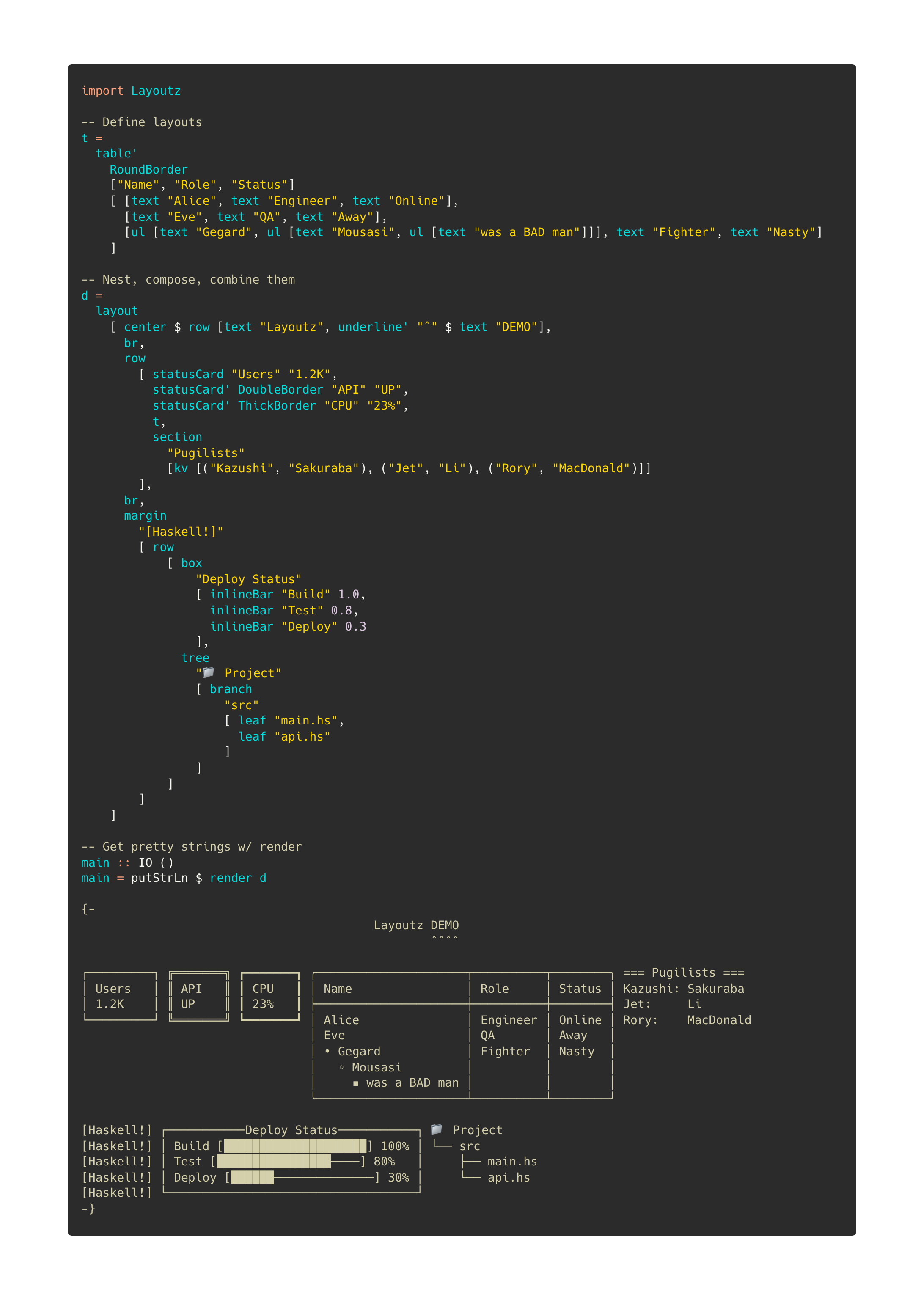
Beautiful, compositional text layouts:
import Layoutz

demo = layout
  [ center $ row [text "Layoutz", underline' "ˆ" $ text "DEMO"]
  , br
  , row
    [ statusCard "Users" "1.2K"
    , statusCard' DoubleBorder "API" "UP"
    , statusCard' ThickBorder "CPU" "23%"
    , table' RoundBorder ["Name", "Role", "Status"]
        [ [text "Alice", text "Engineer", text "Online"]
        , [text "Eve", text "QA", text "Away"]
        ]
    , section "Pugilists" [kv [("Kazushi", "Sakuraba"), ("Jet", "Li")]]
    ]
  ]

putStrLn $ render demo
                                Layoutz DEMO
                                        ˆˆˆˆ

┌─────────┐ ╔═══════╗ ┏━━━━━━━┓ ╭───────┬──────────┬────────╮ === Pugilists ===
│ Users   │ ║ API   ║ ┃ CPU   ┃ │ Name  │ Role     │ Status │ Kazushi: Sakuraba
│ 1.2K    │ ║ UP    ║ ┃ 23%   ┃ ├───────┼──────────┼────────┤ Jet:     Li
└─────────┘ ╚═══════╝ ┗━━━━━━━┛ │ Alice │ Engineer │ Online │
                                │ Eve   │ QA       │ Away   │
                                ╰───────┴──────────┴────────╯
Core concepts
- Every piece of content is an
Element - Elements are immutable and composable - build complex layouts by combining simple elements
- A
layoutarranges elements vertically:
layout [elem1, elem2, elem3] -- Joins with "\n"
Call render on any element to get a string
The power comes from uniform composition - since everything has the Element typeclass, everything can be combined.
Elements
Text
text "Simple text"
Simple text
Line Break
Add line breaks with br:
layout [text "Line 1", br, text "Line 2"]
Line 1

Line 2
Section: section
section "Config" [kv [("env", "prod")]]
section' "-" "Status" [kv [("health", "ok")]]
section'' "#" "Report" 5 [kv [("items", "42")]]
=== Config ===
env: prod

--- Status ---
health: ok

##### Report #####
items: 42
Layout (vertical): layout
layout [text "First", text "Second", text "Third"]
First
Second
Third
Row (horizontal): row
row [text "Left", text "Middle", text "Right"]
Left Middle Right
Horizontal rule: hr
hr
hr' "~"
hr'' "-" 10
──────────────────────────────────────────────────
~~~~~~~~~~~~~~~~~~~~~~~~~~~~~~~~~~~~~~~~~~~~~~~~~~
----------
Key-value pairs: kv
kv [("name", "Alice"), ("role", "admin")]
name: Alice
role: admin
Table: table
Tables automatically handle alignment and borders:
table ["Name", "Age", "City"]
  [ [text "Alice", text "30", text "New York"]
  , [text "Bob", text "25", text ""]  -- Missing values handled
  , [text "Charlie", text "35", text "London"]
  ]
┌─────────┬─────┬─────────┐
│ Name    │ Age │ City    │
├─────────┼─────┼─────────┤
│ Alice   │ 30  │ New York│
│ Bob     │ 25  │         │
│ Charlie │ 35  │ London  │
└─────────┴─────┴─────────┘
Unordered Lists: ul
Clean unordered lists with automatic nesting:
ul [text "Feature A", text "Feature B", text "Feature C"]
• Feature A
• Feature B
• Feature C
Nested lists with auto-styling:
ul [ text "Backend"
   , ul [text "API", text "Database"]
   , text "Frontend"
   , ul [text "Components", ul [text "Header", ul [text "Footer"]]]
   ]
• Backend
  ◦ API
  ◦ Database
• Frontend
  ◦ Components
    ▪ Header
      • Footer
Underline: underline
Add underlines to any element:
underline $ text "Important Title"
underline' "=" $ text "Custom"
Important Title
───────────────

Custom
══════
Box: box
With title:
box "Summary" [kv [("total", "42")]]
┌──Summary───┐
│ total: 42  │
└────────────┘
Without title:
box "" [kv [("total", "42")]]
┌────────────┐
│ total: 42  │
└────────────┘
Status card: statusCard
statusCard "CPU" "45%"
┌───────┐
│ CPU   │
│ 45%   │
└───────┘
Progress bar: inlineBar
inlineBar "Download" 0.75
Download [███████████████─────] 75%
Tree: tree
tree "Project"
  [ branch "src"
      [ leaf "main.hs"
      , leaf "test.hs"
      ]
  , branch "docs"
      [ leaf "README.md"
      ]
  ]
Project
├── src
│   ├── main.hs
│   └── test.hs
└── docs
    └── README.md
Chart: chart
chart [("Web", 10), ("Mobile", 20), ("API", 15)]
Web    │████████████████████ 10
Mobile │████████████████████████████████████████ 20
API    │██████████████████████████████ 15
Padding: pad
Add uniform padding around any element:
pad 2 $ text "content"
content
Centering: center
Smart auto-centering and manual width:
center $ text "Auto-centered"     -- Uses layout context
center' 20 $ text "Manual width"  -- Fixed width
        Auto-centered

    Manual width
Margin: margin
Use margin for colorful "compiler-style" prefixes:
layout
  [ marginError [text "Type error: expected Int, got String"]
  , marginWarn [text "Unused variable 'temp'"]
  , marginSuccess [text "Build completed successfully"]
  , marginInfo [text "Pro tip: Use layoutz for beautiful output"]
  ]
[error] Type error: expected Int, got String
[warn] Unused variable 'temp'
[success] Build completed successfully
[info] Pro tip: Use layoutz for beautiful output
Border Styles
Elements like box, table, and statusCard support different border styles:
NormalBorder (default):
box "Title" [text "content"]
┌──Title──┐
│ content │
└─────────┘
DoubleBorder:
statusCard' DoubleBorder "API" "UP"
╔═══════╗
║ API   ║
║ UP    ║
╚═══════╝
ThickBorder:
table' ThickBorder ["Name"] [[text "Alice"]]
┏━━━━━━━┓
┃ Name  ┃
┣━━━━━━━┫
┃ Alice ┃
┗━━━━━━━┛
RoundBorder:
box' RoundBorder "Info" [text "content"]
╭──Info───╮
│ content │
╰─────────╯
REPL Usage
Drop into GHCi to experiment:
cabal repl
λ> import Layoutz
λ> putStrLn $ render $ center $ box "Hello" [text "World!"]
┌──Hello──┐
│ World!  │
└─────────┘
λ> putStrLn $ render $ table ["A", "B"] [[text "1", text "2"]]
┌───┬───┐
│ A │ B │
├───┼───┤
│ 1 │ 2 │
└───┴───┘
Inspiration
- Original Scala layoutz.