

Read Paradox Database Files into R.

Rparadox: A Modern Interface for Reading Paradox Databases in R
Rparadox provides a simple and efficient way to read data from Paradox database files (.db) directly into R as modern tibble data frames. It uses the underlying pxlib C library to handle the low-level file format details and provides a clean, user-friendly R interface.
This package is designed to “just work” for the most common use case: extracting the full dataset from a Paradox table, including its associated BLOB/memo file (.mb).
Features
- Direct Reading: Reads Paradox
.dbfiles without needing database drivers or external software. - Tibble Output: Returns data in the
tibbleformat, which is fully compatible with the Tidyverse ecosystem. - Automatic BLOB Handling: Automatically detects, attaches, and reads data from associated memo/BLOB (
.mb) files. - Encryption Support: Supports reading password-protected Paradox files.
- Character Encoding Control: Automatically handles character encoding conversion to UTF-8 and allows the user to manually override the source encoding for files with incorrect headers.
- Type Conversion: Correctly maps Paradox data types to their corresponding R types, including
Date,Time(hms),Timestamp(POSIXct),Logical,Integer,Numeric, and binaryblobobjects.
Installation
# stable version from CRAN
install.packages("Rparadox")
You can install the development version of Rparadox from GitHub using the devtools package.
# install.packages("devtools")
devtools::install_github("celebithil/Rparadox")
Usage
Basic Usage: The read_paradox() function
The easiest way to read a Paradox file is with the high-level read_paradox() function. It handles opening the file, reading the data, and closing the connection in a single step.
# 1. Load the package
library(Rparadox)

# 2. Get the path to an example database
# In a real scenario: db_path <- "path/to/your/data.db"
db_path <- system.file("extdata", "biolife.db", package = "Rparadox")

# 3. Read the data directly into a tibble
# This automatically finds 'biolife.mb' and handles data types.
biolife_data <- read_paradox(db_path)

# 4. View the data
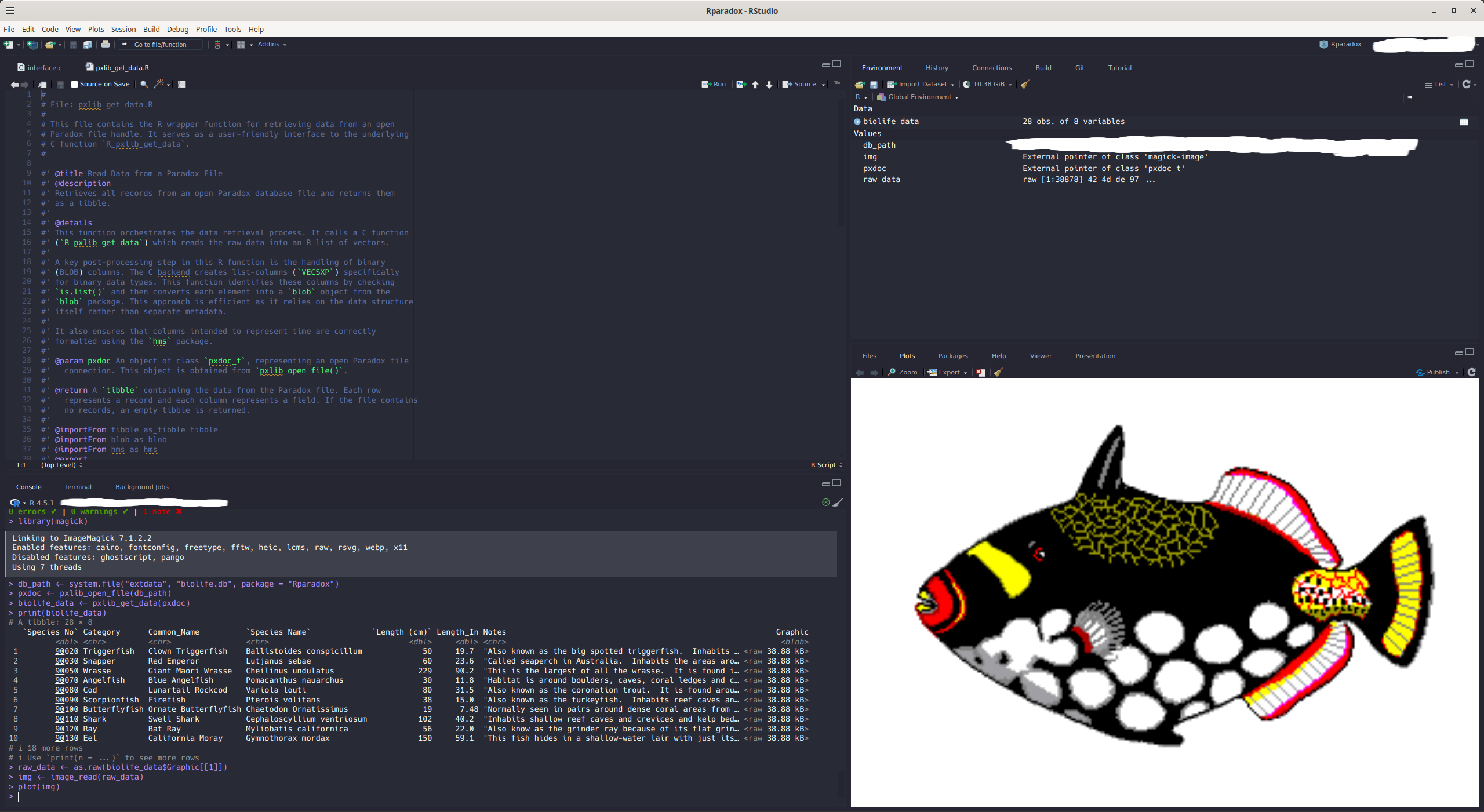
print(biolife_data)
#> # A tibble: 28 × 8
#>    `Species No` Category      Common_Name `Species Name` `Length (cm)` Length_In
#>           <dbl> <chr>         <chr>       <chr>                  <dbl>     <dbl>
#>  1        90020 Triggerfish   Clown Trig… Ballistoides …            50     19.7
#>  2        90030 Snapper       Red Emperor Lutjanus sebae            60     23.6
#>  3        90050 Wrasse        Giant Maor… Cheilinus und…           229     90.2
#>  4        90070 Angelfish     Blue Angel… Pomacanthus n…            30     11.8
#>  5        90080 Cod           Lunartail … Variola louti             80     31.5
#>  6        90090 Scorpionfish  Firefish    Pterois volit…            38     15.0
#>  7        90100 Butterflyfish Ornate But… Chaetodon Orn…            19      7.48
#>  8        90110 Shark         Swell Shark Cephaloscylli…           102     40.2
#>  9        90120 Ray           Bat Ray     Myliobatis ca…            56     22.0
#> 10        90130 Eel           California… Gymnothorax m…           150     59.1
#> # ℹ 18 more rows
#> # ℹ 2 more variables: Notes <chr>, Graphic <blob>
Reading Encrypted Files
If your Paradox file is password-protected, simply provide the password using the password argument:
library(Rparadox)
# Read a password-protected file
secure_data <- read_paradox("path/to/encrypted.db", password = "secret_password")
Handling Incorrect Character Encoding
If you have a legacy file where the encoding is specified incorrectly in the header, you can manually override it using the encoding parameter with read_paradox().
library(Rparadox)
# This tells the package to interpret the source data as CP866
data <- read_paradox("path/to/your/file.db", encoding = "cp866")
This ensures that all text fields are correctly converted to UTF-8 in the final tibble.
Advanced Usage
For more control, you can use the lower-level functions. This is useful if you want to inspect metadata before reading the full dataset.
library(Rparadox)
db_path <- system.file("extdata", "biolife.db", package = "Rparadox")

# 1. Open the file and get a handle
pxdoc <- pxlib_open_file(db_path)

if (!is.null(pxdoc)) {
  # 2. Get metadata without reading all the data
  metadata <- pxlib_metadata(pxdoc)

  # Metadata now includes human-readable field types and detected encoding
  cat("Encoding:", metadata$encoding, "\n")
  cat("Number of records:", metadata$num_records, "\n")
  print(head(metadata$fields))

  # 3. Read the actual data
  data_table <- pxlib_get_data(pxdoc)

  # 4. Always close the file when you're done
  pxlib_close_file(pxdoc)

  print(data_table)
}
#> Encoding: CP437
#> Number of records: 28
#>           name   type size
#> 1   Species No Number    8
#> 2     Category  Alpha   15
#> 3  Common_Name  Alpha   30
#> 4 Species Name  Alpha   40
#> 5  Length (cm) Number    8
#> 6    Length_In Number    8
#> # A tibble: 28 × 8
#>    `Species No` Category      Common_Name `Species Name` `Length (cm)` Length_In
#>           <dbl> <chr>         <chr>       <chr>                  <dbl>     <dbl>
#>  1        90020 Triggerfish   Clown Trig… Ballistoides …            50     19.7
#>  2        90030 Snapper       Red Emperor Lutjanus sebae            60     23.6
#>  3        90050 Wrasse        Giant Maor… Cheilinus und…           229     90.2
#>  4        90070 Angelfish     Blue Angel… Pomacanthus n…            30     11.8
#>  5        90080 Cod           Lunartail … Variola louti             80     31.5
#>  6        90090 Scorpionfish  Firefish    Pterois volit…            38     15.0
#>  7        90100 Butterflyfish Ornate But… Chaetodon Orn…            19      7.48
#>  8        90110 Shark         Swell Shark Cephaloscylli…           102     40.2
#>  9        90120 Ray           Bat Ray     Myliobatis ca…            56     22.0
#> 10        90130 Eel           California… Gymnothorax m…           150     59.1
#> # ℹ 18 more rows
#> # ℹ 2 more variables: Notes <chr>, Graphic <blob>
Links
- pxlib C library: https://github.com/steinm/pxlib
- CRAN page: https://cran.r-project.org/package=Rparadox
- Bug reports: https://github.com/celebithil/Rparadox/issues.