MyNixOS website logo
Description

Find Code Snippets with Context and Click to Navigate Directly to Results.

Search across R files with contextual results, highlights and clickable links. Includes an add-in for further workflow enhancement.

contextFind

CRAN_Status_Badge R CMDCheck

The goal of contextFind is to help developers find relevant parts of their code, especially helpful when code expands beyond a single file, such as with Shiny applications.

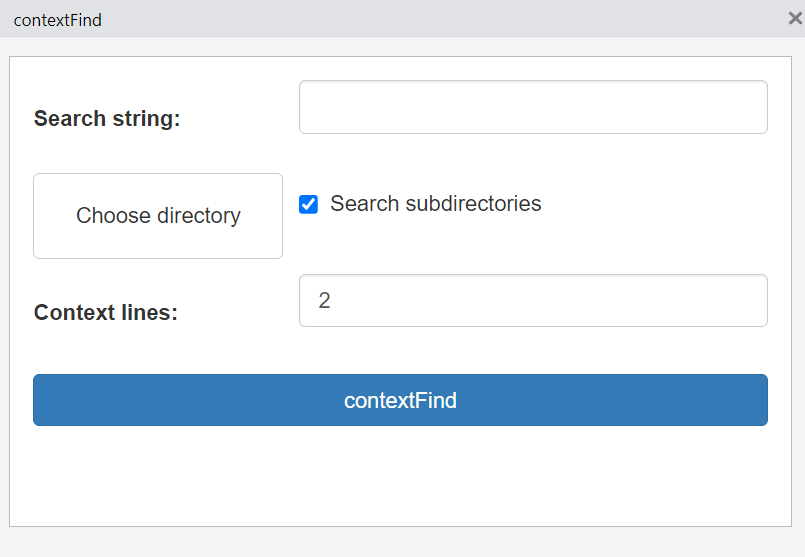
The package includes an addin to bind contextFind() to a hotkey (e.g., Ctrl+Shift+F). This opens a mini shiny application with inputs for the search string, the directory, whether to search subdiretories, and how many lines of context to print before and after the found search string:
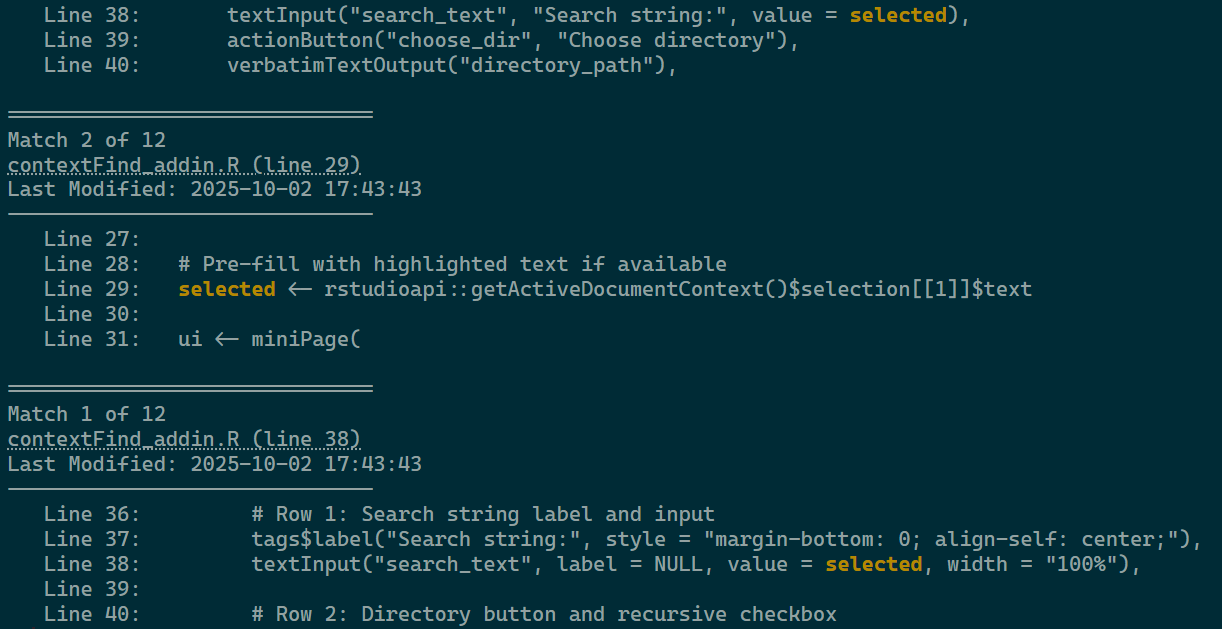
Clicking the contextFind button prints the results to the console. For each result (match), contextFind() provides a clickable labelled link indicating the file and line number of the result, followed by contextLines=2 lines before and after the occurrence, with the found string highlighted in yellow. The results are ordered with most recently modified files at the bottom of the list for ease of reading in the console.

Installation

You can install the latest version of contextFind from GitHub with:

devtools::install_github("s87jackson/contextFind")

or the CRAN stable release with:

install.packages("contextFind")

Use

After installing contextFind, restart RStudio, then set contextFind to a hotkey by selecting Tools >> Modify Keyboard Shortcuts:
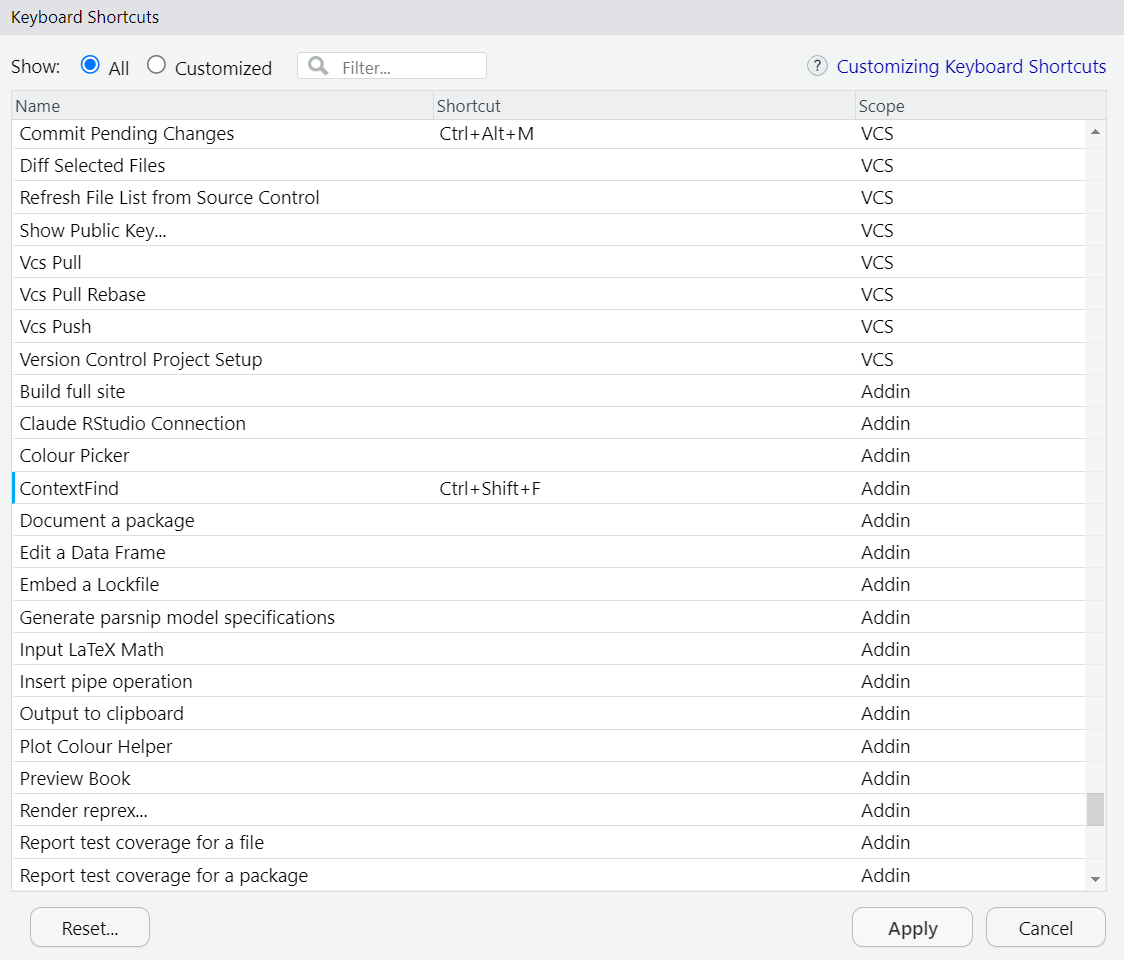
Now typing Ctrl+Shift+F opens the gadget to perform the search. If text is higlighted when you type the hotkey, it will be passed to the gadget automatically. In the example below, we search for the string ‘selected’ and see the results:
Metadata

Version

1.0.1

License

Unknown

Platforms (76)

    Darwin
    FreeBSD
    Genode
    GHCJS
    Linux
    MMIXware
    NetBSD
    none
    OpenBSD
    Redox
    Solaris
    WASI
    Windows
Show all
  • aarch64-darwin
  • aarch64-freebsd
  • aarch64-genode
  • aarch64-linux
  • aarch64-netbsd
  • aarch64-none
  • aarch64-windows
  • aarch64_be-none
  • arm-none
  • armv5tel-linux
  • armv6l-linux
  • armv6l-netbsd
  • armv6l-none
  • armv7a-linux
  • armv7a-netbsd
  • armv7l-linux
  • armv7l-netbsd
  • avr-none
  • i686-cygwin
  • i686-freebsd
  • i686-genode
  • i686-linux
  • i686-netbsd
  • i686-none
  • i686-openbsd
  • i686-windows
  • javascript-ghcjs
  • loongarch64-linux
  • m68k-linux
  • m68k-netbsd
  • m68k-none
  • microblaze-linux
  • microblaze-none
  • microblazeel-linux
  • microblazeel-none
  • mips-linux
  • mips-none
  • mips64-linux
  • mips64-none
  • mips64el-linux
  • mipsel-linux
  • mipsel-netbsd
  • mmix-mmixware
  • msp430-none
  • or1k-none
  • powerpc-linux
  • powerpc-netbsd
  • powerpc-none
  • powerpc64-linux
  • powerpc64le-linux
  • powerpcle-none
  • riscv32-linux
  • riscv32-netbsd
  • riscv32-none
  • riscv64-linux
  • riscv64-netbsd
  • riscv64-none
  • rx-none
  • s390-linux
  • s390-none
  • s390x-linux
  • s390x-none
  • vc4-none
  • wasm32-wasi
  • wasm64-wasi
  • x86_64-cygwin
  • x86_64-darwin
  • x86_64-freebsd
  • x86_64-genode
  • x86_64-linux
  • x86_64-netbsd
  • x86_64-none
  • x86_64-openbsd
  • x86_64-redox
  • x86_64-solaris
  • x86_64-windows