

The Decision Diffusion Model.
📦 ddModel: Core Functions for the Decision Diffusion Model


ddModel provides fast and flexible computational tools for the Decision Diffusion Model (DDM) - a widely used cognitive model for analysing choice and response time (RT) in speeded decision-making tasks.
🔍 Overview
This package supports:
- End-to-end DDM support: density, distribution, and random sampling functions
- Flexible parameterisation:
- Fix parameters globally
- Constrain by experimental conditions
- Vary subject-by-subject (hierarchical modelling ready)
- Efficient likelihood evaluation: fully vectorised for large-scale datasets
- Seamless integration: designed to work smoothly with the
ggdmc
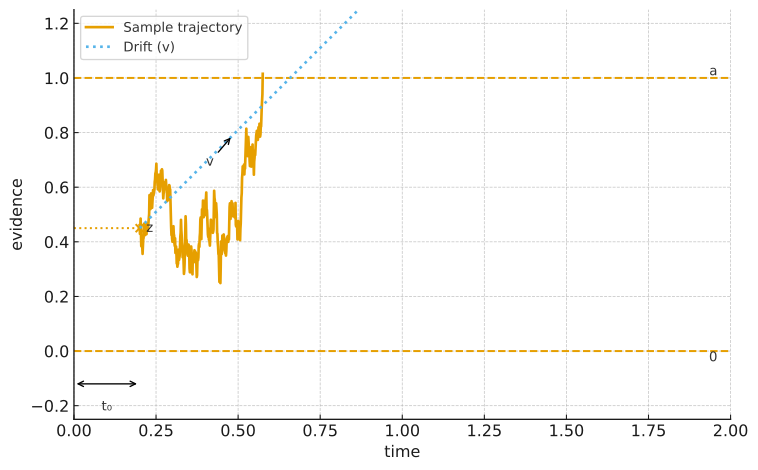 Figure: Illustration of the DDM. Evidence accumulates over time with drift rate v until it reaches one of the decision boundaries (a or 0). The starting point z and non-decision time t₀ are also shown; variability parameters, sv, sz, and st₀ were set to 0.
🧠 Key Features
- Implements canonical DDM components:
a(boundary separation),v(drift rate),t₀(non-decision time),z(starting point), plus optional variability parameterssv,sz,st₀ - Simulation tools for:
- Subject-level and population-level datasets
- Model recovery studies & power analysis
- Likelihood and density functions optimised for speed
- Ready for hierarchical modelling pipelines (
ggdmcModel,ggdmcPrior,ggdmcHeaders)
📌 Who Is It For?
- Experimental psychologists modelling two-alternative forced-choice (2AFC) tasks
- Cognitive scientists running simulation-based model recovery or parameter estimation
- Researchers and data scientists needing synthetic data for benchmarking or educational demos
🚀 Quick Start
# Install from CRAN
install.packages("ddModel")

# Or development version
# install.packages("devtools")
devtools::install_github("yxlin/ddModel")

library(ddModel)
library(ggdmcModel)
library(ggdmcPrior)
✅ Example Workflow
1. Build a DDM Specification
# Load packages
library(ggdmcModel)
library(ggdmcPrior)
library(ddModel)

# Set up a stimulus drift rate model
model <- BuildModel(
  p_map = list(
    a = "1", v = "1", z = "1", d = "1", sz = "1", sv = "1",
    t0 = "1", st0 = "1", s = "1", precision = "1"
  ),
  match_map = list(M = list(s1 = "r1", s2 = "r2")),
  factors = list(S = c("s1", "s2")),
  constants = c(d = 0, s = 1, st0 = 0, precision = 3),
  accumulators = c("r1", "r2"),
  type = "fastdm"
)
2. Set up Hierarchical Priors
# Set up a population-level prior distribution
pop_mean  <- c(a = 1, sv = 0.1, sz = 0.25, t0 = 0.15, v = 2.5, z = 0.38)
pop_scale <- c(a = 0.05, sv = 0.01, sz = 0.01, t0 = 0.02, v = 0.5, z = 0.01)
pop_dist  <- BuildPrior(
  p0    = pop_mean,
  p1    = pop_scale,
  lower = c(0, 0, 0, 0, -10, 0),
  upper = rep(NA, length(pop_mean)),
  dists = rep("tnorm", length(pop_mean)),
  log_p = rep(FALSE, length(pop_mean))
)

# Visualise the prior
plot_prior(pop_dist)
3. Simulate Data
# Subject-level and population-level model setup
sub_model <- setDDM(model)
pop_model <- setDDM(model, population_distribution = pop_dist)

# Simulate subject-level data
p_vector <- c(a = 1, sv = 0.1, sz = 0.25, t0 = 0.15, v = 2.5, z = 0.38)
dat      <- simulate(sub_model, nsim = 256, parameter_vector = p_vector, n_subject = 1)

# Simulate hierarchical data (32 subjects)
hdat     <- simulate(pop_model, nsim = 128, n_subject = 32)
⚙️ Core Function Demo pfastdm
RT <- seq(0.1, 1.2, 0.01)
params <- c(
  a = 1, v = 1.5, zr = 0.5, d = 0,
  sz = 0.05, sv = 0.01, t0 = 0.15, st0 = 0.001,
  s = 1, precision = 3
)
# Ensure parameter names are ordered
params <- params[sort(names(params))]

# Compute lower-bound response density
result <- pfastdm(RT, params, is_lower = TRUE, debug = TRUE)
🧩 Dependencies
- R (≥ 3.3.0)
Rcpp(≥ 1.0.7)RcppArmadillo(≥ 0.10.7.5.0)ggdmcModel,ggdmcPrior,ggdmcHeaders
🔎 How Does ddModel Compare to HDDM and fastdm?
If you’ve worked with other diffusion model toolkits, you might wonder how ddModel fits in. Here’s a quick comparison:
Language & Workflow Integration
HDDM: Python-based Bayesian modelling using PyMC; powerful but requires a Python workflow.fastdm: Stand-alone C++ executable; very fast, but limited R integration and less flexible parameter mapping.ddModel: Native R + C++ (via RcppArmadillo), integrates seamlessly with R packages likeggdmcfor hierarchical inference and DE-MCMC sampling.
Flexibility
ddModelsupports global, condition-wise, and subject-wise parameter specifications.- Exposes vectorised density and likelihood functions that can plug into any inference framework.
- Easy simulation pipelines for subject-level or population-level data.
Speed and Transparency
- Written in modern Rcpp/C++; matches
fastdmspeed but remains fully open and modifiable within R. - Direct access to all functions; no need for command-line wrappers or external scripts.
- Written in modern Rcpp/C++; matches
Educational and Research Use
- Simple API for teaching and generating synthetic datasets.
- Lightweight alternative if you don’t need
HDDM’s full Bayesian machinery.
A comparison table at a glance:
| Tool | Language | Speed | Bayesian Support | Integration Style |
|---|---|---|---|---|
HDDM | Python | Medium | Yes (PyMC3/PyMC) | Python workflow only |
fastdm | C++ binary | High | No | CLI / external program |
| ddModel | R + C++ | High | Via ggdmc (DE-MCMC) | Native R, modular & open |
Why choose
ddModel?If you work primarily in R or use the
ggdmcecosystem,ddModelprovides fast, flexible, and fully integrated DDM tools out of the box.
📚 Key References
- Voss, A., Rothermund, K., & Voss, J. (2004). Interpreting the parameters of the diffusion model: An empirical validation. Behavior Research Methods, Instruments, & Computers, 36(3), 347–360. https://doi.org/10.3758/BF03196893
- Voss, A., & Voss, J. (2007). Fast-dm: A free program for efficient diffusion model analysis. Behavior Research Methods, 39(4), 767–775. https://doi.org/10.3758/BF03192967
- Ratcliff, R., & McKoon, G. (2008). The diffusion decision model: Theory and data for two-choice decision tasks. Neural Computation, 20(4), 873–922. https://doi.org/10.1162/neco.2008.12-06-420
📬 Contact & Contributions
- Yi-Shin Lin
- Email: [email protected]
- GitHub: @yxlin
Contributions welcome! Please open an issue or pull request on GitHub.