

Create 3D Regression Surfaces.
regress3d

regress3d is an R package for plotting regression surfaces and marginal effects in three dimensions. The plots created by regress3d are plotly objects. They can be customized using functions and arguments from the plotly package.
The core two functions of regress3d are
add_3d_surface(): create a three dimensional surface for a regression with two explanatory $x$ variables , andadd_marginals(): create a three dimensional visual for the marginal effects of a regression with two explanatory $x$ variables.
Getting Started
The vignettes walk you through examples of regression surfaces for three types of models.
- Linear models: These models create flat regression surfaces.
- Linear models with an interaction term: A linear model with an interaction term creates a curved regression surface with linear marginal effects.
- Generalized linear models: These models produce curved regression surfaces.
A handy feature for binomial glms and other regressions that use discrete data is the function add_jitter(). This function mimics ggplot2::geom_jitter() in ggplot2, helping users visualize overlaid points in a three dimensional graphic. It is demonstrated in the generalized linear models vignette.
We recommend you start with the vignette on linear models, which will introduce you to working with the interactive images, interpreting the regression surface, and understanding how the marginal effects are depicted. ## Installation
Install regress3d from GitHub:
if (!require("devtools")) {
  install.packages("devtools")
}

devtools::install_github("ellaFosterMolina/regress3d")
Example
regress3d allows the user to plot regression surfaces and marginal effects in three dimensions. Linear models, generalized linear models, and either of those model types with interaction terms are currently supported.
A multiple linear regression surface and marginal effects are shown below using the core two functions in regress3d:
add_3d_surface(), andadd_marginals().
Setup
Start by calling the two required libraries: regress3d and plotly.
library(regress3d)
library(plotly)
Data
The variables in this example are county level measures from 2016.
r_shift: the shift towards Donald Trump in 2016, as measured as the difference between the county’s vote for Trump in 2016 and the county’s vote for the Republican presidential nominee, Mitt Romney, in 2012,median_income16: median income, andany_college: the percent of the county that was enrolled in college at some point, regardless of whether they graduated.
The regression is weighted by pop_estimate16, the number of people in a county, to capture the influence of large counties.
Model
The model can be specified within add_3d_surface() and add_marginals(), but for clarity we specify it before we create the graphic. Here we use a multiple linear regression with two $x$ variables.
mymodel <- lm(r_shift ~ median_income16 + any_college,
              data = county_data, weight = pop_estimate16)
Regression surface
Next, we create a plotly::plot_ly() object using the same variables as in the model. We then layer on the scattercloud, 3D surface, marginals, and labels.
Note that while regression notation often uses $x_1$ and $x_2$ to represent the explanatory variables and $y$ for the outcome, the plotly command will use $x$ and $y$ for the explanatory variables and $z$ for the outcome variable.
plot_ly( data = county_data,
         x = ~median_income16,
         y = ~any_college,
         z = ~r_shift) %>%
  add_markers(size = ~pop_estimate16, color = I("black"))  %>%
  add_3d_surface(model = mymodel) %>%
  add_marginals(model = mymodel) %>%
  layout(
    scene = list(xaxis = list(title = 'County median income'),
                 yaxis = list(title = 'County college experience'),
                 zaxis = list(title = 'Shift to Trump'))
  )
The code above renders to an html figure. It displays the outputs of:
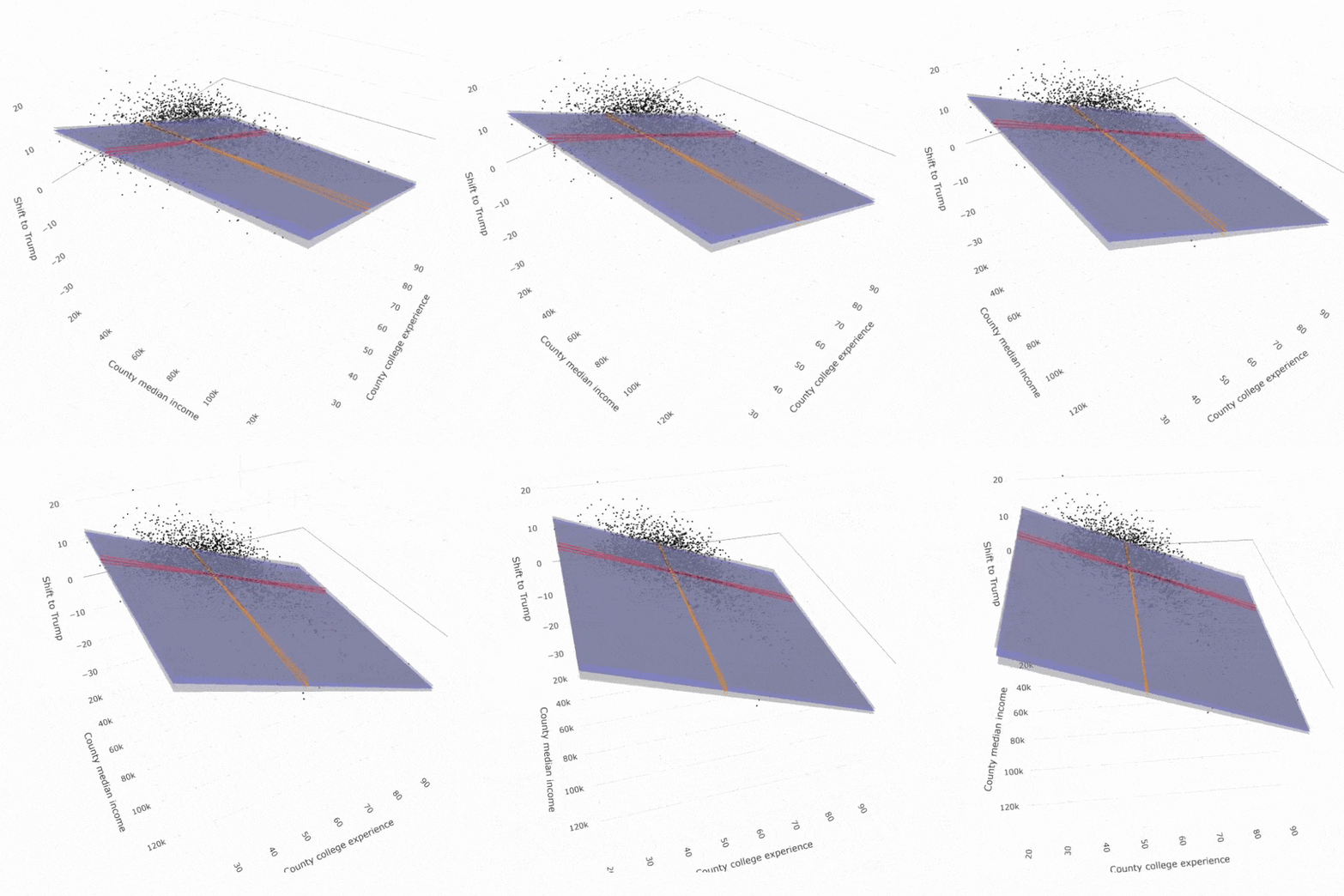
add_3d_surface(): a regression surface in translucent blue with 95% confidence intervals in translucent grey;add_marginals(): the marginal effects and 95% confidence intervals of each $x$ variable with red and orange lines;plotly::add_markers(): a plotly function to create a scattercloud of each county used to generate the regression surface;plotly::layout(): a plotly function to adjust the graphic’s labels.
Since the landing page for a package does not support interactive html figures, a gif is displayed below. See https://ellafostermolina.github.io/regress3d/articles/linear_models_3d.html#improvements-with-plotly for an interactive version of this image.
Numeric regression results
This graphic corresponds to the following numerical regression results.
% shift to Trump, 2012-2016 | |
County median income ($1,000s) | -0.013 |
(0.007) | |
County college experience | -0.344* |
(0.012) | |
Constant | 20.103* |
(0.512) | |
Observations | 3,111 |
Adjusted R2 | 0.371 |
Note: | * p<0.05 |