MyNixOS website logo
Description

Dynamic Revision Letters for 'Rmarkdown' Manuscripts.

Extracts tagged text from markdown manuscripts for inclusion in dynamically generated revision letters. Provides an R markdown template based on papaja::revision_letter_pdf() with comment cross-referencing, a system for managing multiple sections of extracted text, and a way to automatically determine the page number of quoted sections from PDF manuscripts.

revise

R-CMD-check

The goal of revise is to support authors in responding to revise and resubmit requests. These functions are designed to work with crsh/papaja.

Installation

You can install the development version of {revise} from GitHub with:

# install.packages("remotes")
remotes::install_github("conig/revise")

Starting a revision document

ReviewerComment addin

We have included an addin so you can mark text as a reviewer comment. If a YAML header is not detected in document the addin will add it. Fields will automatically be filled in if there is a .rmd file in the working directory. Additionally, selected text will be marked as a reviewer comment by including it within an “asis” chunk. Text below this chunk will be tagged as an author response. A hotkey can be set for this addin (e.g. Ctrl+Shift+R).
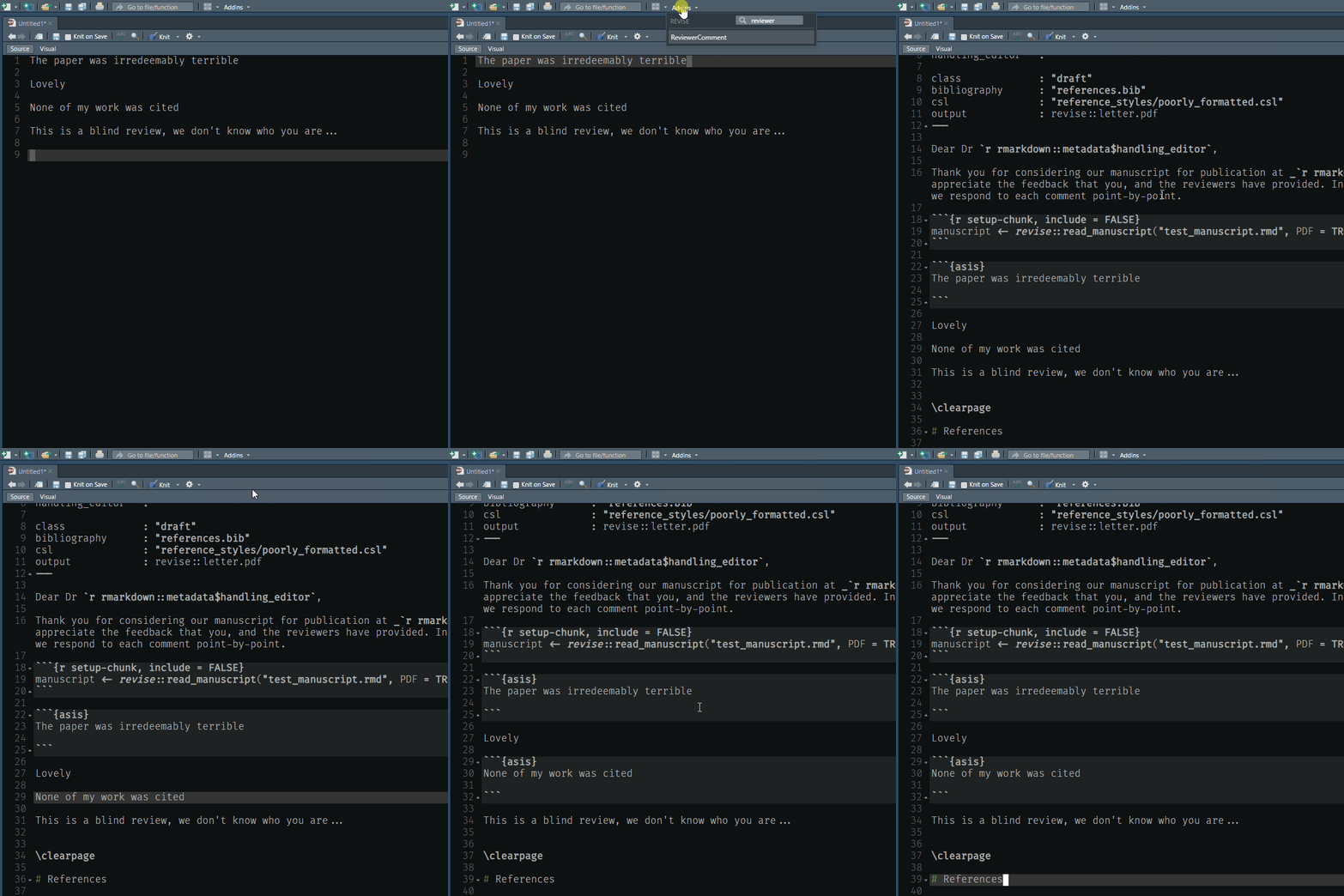
animation of ReviewerComment addin

Loading a manuscript

You can use rmd or docx files with revise. To load either, simply call revise::read_manuscript(“your_file.rmd”)

For example. Here is an example docx where content has been tagged with comment boxes. E.g, Revise::hard

docx_path <- system.file("examples/word_test.docx", package = "revise")

man <- read_manuscript(docx_path)
man
#> <Manuscript>
#> [34m- 6 sections[39m
#> [31mNo PDF attached[39m

We can see all tagged sections by running

names(man$sections)
#> [1] "track_changes" "section"       "multi_lines"   "bullets"       "hard"          "numbered"

Then we can retrieve using a section name

revision <- get_revision("hard", man)
revision
#> [1] ">Hard example\n>\n>This section has all features:\n>\n>* Bullet1\n>\n>* Bullet2\n>\n>* Bullet3\n>\n>Some more text is here."

This content can then be put directly into a response document using single backticks.

Metadata

Version

0.1.0

License

Unknown

Platforms (76)

    Darwin
    FreeBSD
    Genode
    GHCJS
    Linux
    MMIXware
    NetBSD
    none
    OpenBSD
    Redox
    Solaris
    WASI
    Windows
Show all
  • aarch64-darwin
  • aarch64-freebsd
  • aarch64-genode
  • aarch64-linux
  • aarch64-netbsd
  • aarch64-none
  • aarch64-windows
  • aarch64_be-none
  • arm-none
  • armv5tel-linux
  • armv6l-linux
  • armv6l-netbsd
  • armv6l-none
  • armv7a-linux
  • armv7a-netbsd
  • armv7l-linux
  • armv7l-netbsd
  • avr-none
  • i686-cygwin
  • i686-freebsd
  • i686-genode
  • i686-linux
  • i686-netbsd
  • i686-none
  • i686-openbsd
  • i686-windows
  • javascript-ghcjs
  • loongarch64-linux
  • m68k-linux
  • m68k-netbsd
  • m68k-none
  • microblaze-linux
  • microblaze-none
  • microblazeel-linux
  • microblazeel-none
  • mips-linux
  • mips-none
  • mips64-linux
  • mips64-none
  • mips64el-linux
  • mipsel-linux
  • mipsel-netbsd
  • mmix-mmixware
  • msp430-none
  • or1k-none
  • powerpc-linux
  • powerpc-netbsd
  • powerpc-none
  • powerpc64-linux
  • powerpc64le-linux
  • powerpcle-none
  • riscv32-linux
  • riscv32-netbsd
  • riscv32-none
  • riscv64-linux
  • riscv64-netbsd
  • riscv64-none
  • rx-none
  • s390-linux
  • s390-none
  • s390x-linux
  • s390x-none
  • vc4-none
  • wasm32-wasi
  • wasm64-wasi
  • x86_64-cygwin
  • x86_64-darwin
  • x86_64-freebsd
  • x86_64-genode
  • x86_64-linux
  • x86_64-netbsd
  • x86_64-none
  • x86_64-openbsd
  • x86_64-redox
  • x86_64-solaris
  • x86_64-windows
