

Interface to 'TA-Lib' for Technical Analysis and Candlestick Patterns.
{talib}: A Technical Analysis and Candlestick Pattern Library in R 


{talib} is an R package for technical analysis, candlestick pattern recognition, and interactive financial charting—built on the TA-Lib C library. It provides 67 technical indicators, 61 candlestick patterns, and a composable charting system powered by {plotly} and {ggplot2}. All indicator computations are implemented in C via .Call() for minimal overhead.
Alongside {TTR}, {talib} adds candlestick pattern recognition and interactive charts to the R technical analysis ecosystem.
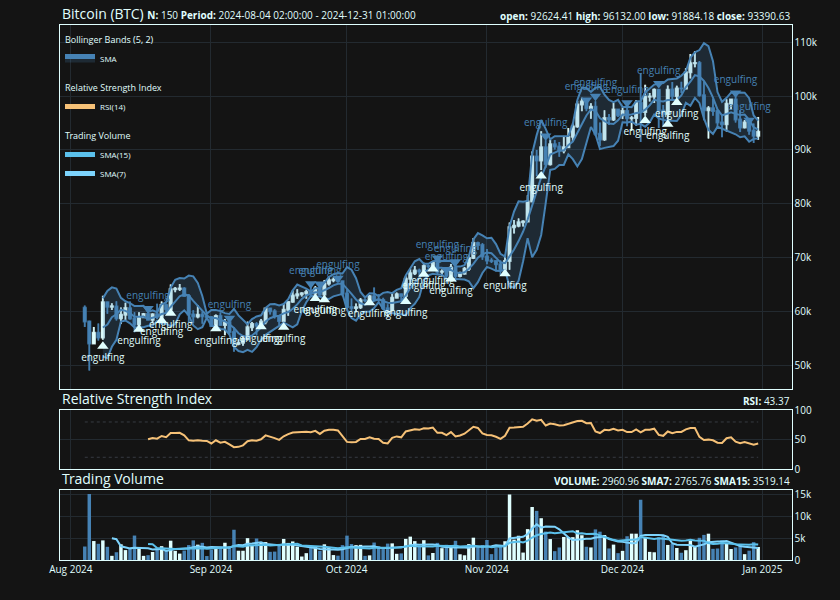
{
    ## create a candlestick chart
    talib::chart(BTC, title = "Bitcoin (BTC)")

    ## overlay Bollinger Bands on
    ## the price panel
    talib::indicator(talib::bollinger_bands)

    ## mark Engulfing candlestick
    ## patterns on the chart
    talib::indicator(talib::engulfing, data = BTC)

    ## add RSI and volume as
    ## separate sub-panels
    talib::indicator(talib::RSI)
    talib::indicator(talib::trading_volume)
}
Indicators
Every indicator follows the same interface: pass an OHLCV data.frame or matrix and get the same type back. The return type always matches the input.
## compute Bollinger Bands
## on BTC OHLCV data
tail(
    talib::bollinger_bands(BTC)
)
#>                     UpperBand MiddleBand LowerBand
#> 2024-12-26 01:00:00 100487.38   96698.61  92909.83
#> 2024-12-27 01:00:00 100670.65   96512.96  92355.27
#> 2024-12-28 01:00:00 100632.13   96581.91  92531.69
#> 2024-12-29 01:00:00  99628.77   95576.60  91524.43
#> 2024-12-30 01:00:00  96403.53   94231.31  92059.09
#> 2024-12-31 01:00:00  95441.13   93774.23  92107.34
Candlestick Patterns
{talib} recognizes 61 candlestick patterns—from single-candle formations like Doji and Hammer to multi-candle patterns like Morning Star and Three White Soldiers. Each pattern returns a normalized score: 1 (bullish), -1 (bearish), or 0 (no pattern).
## detect Engulfing patterns:
## 1 = bullish, -1 = bearish, 0 = none
tail(
    talib::engulfing(BTC)
)
#>                     CDLENGULFING
#> 2024-12-26 01:00:00           -1
#> 2024-12-27 01:00:00            0
#> 2024-12-28 01:00:00            0
#> 2024-12-29 01:00:00           -1
#> 2024-12-30 01:00:00            0
#> 2024-12-31 01:00:00            0
Charts
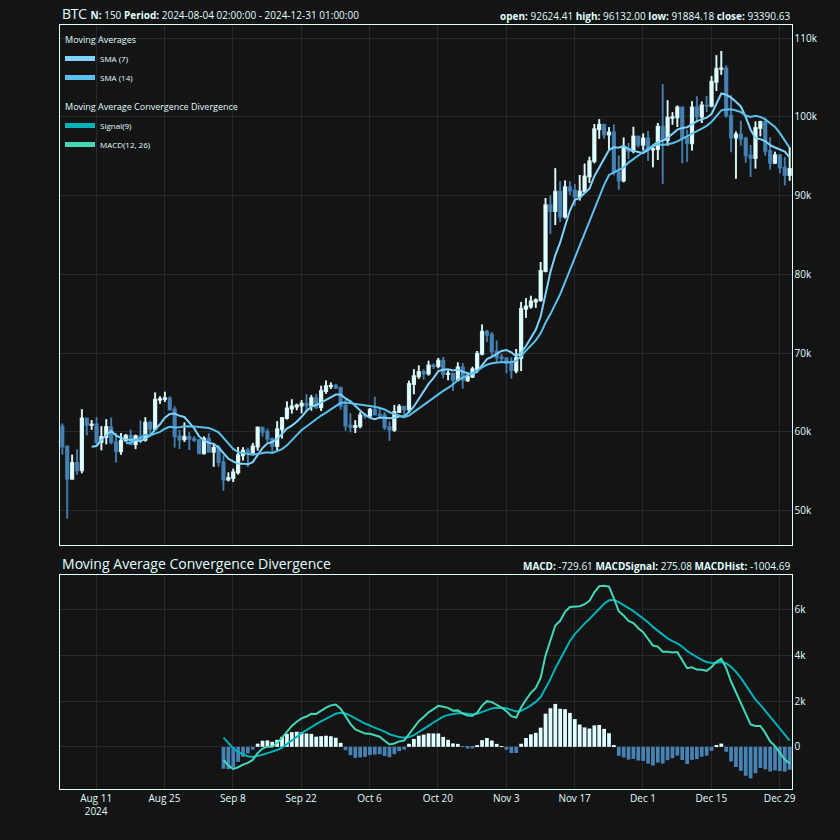
Charts are built in two steps: chart() creates the price chart, then indicator() layers on technical indicators. Overlap indicators (moving averages, Bollinger Bands) draw on the price panel; oscillators (RSI, MACD) get their own sub-panels.
{
    ## price chart with two moving
    ## averages and MACD below
    talib::chart(BTC)
    talib::indicator(talib::SMA, n = 7)
    talib::indicator(talib::SMA, n = 14)
    talib::indicator(talib::MACD)
}
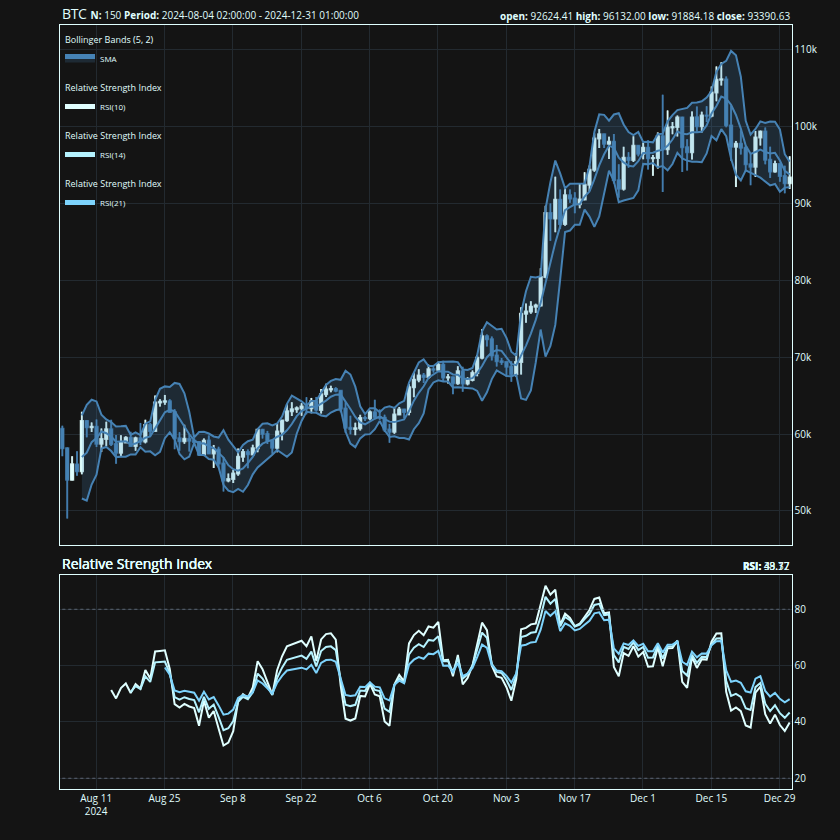
Multiple indicators can share a sub-panel by passing them as calls:
{
    talib::chart(BTC)
    talib::indicator(talib::BBANDS)

    ## pass multiple calls to combine
    ## them on a single sub-panel
    talib::indicator(
        talib::RSI(n = 10),
        talib::RSI(n = 14),
        talib::RSI(n = 21)
    )
}
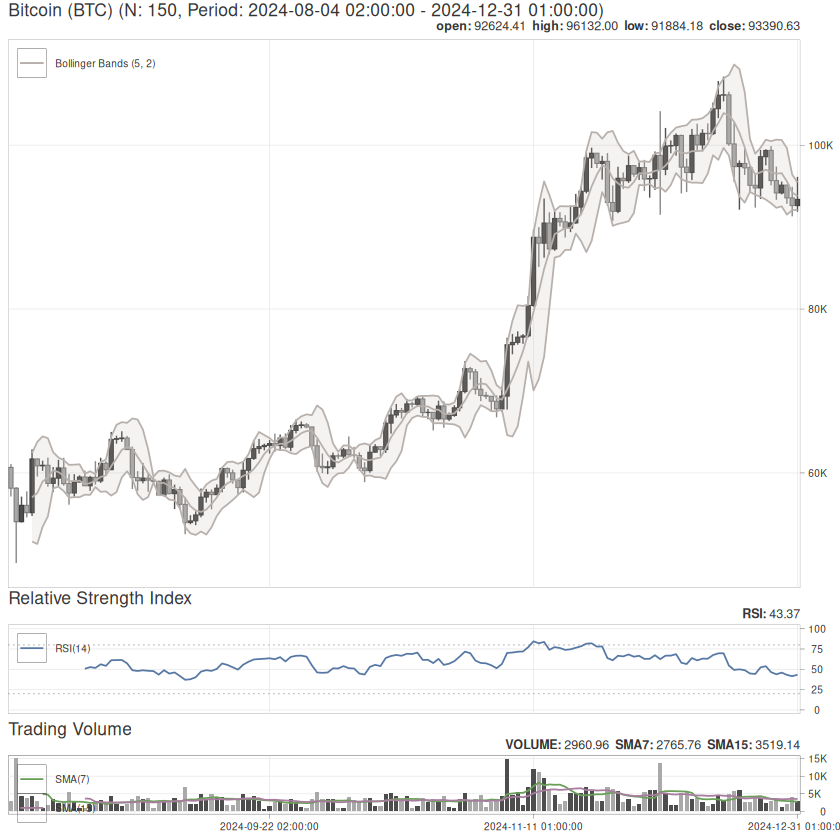
The charting system ships with 5 built-in themes: default, hawks_and_doves, payout, tp_slapped, and trust_the_process. Switch themes with set_theme(). Both {plotly} (interactive, default) and {ggplot2} (static) backends are supported:
{
    ## switch to ggplot2 backend with
    ## the "Hawks and Doves" theme
    talib::set_theme("hawks_and_doves")
    talib::chart(BTC, title = "Bitcoin (BTC)")
    talib::indicator(talib::BBANDS)
    talib::indicator(talib::RSI)
    talib::indicator(talib::trading_volume)
}
Column selection
Indicators use the columns they need automatically. When your data has non-standard column names, remap them with formula syntax:
## remap 'price' to the close column
talib::RSI(x, cols = ~price)

## remap hi, lo, last to high, low, close
talib::stochastic(x, cols = ~ hi + lo + last)
Naming
Functions use descriptive snake_case names, but every function is aliased to its TA-Lib shorthand for compatibility with the broader ecosystem:
| Category | TA-Lib (C) | {talib} | {talib} alias |
|---|---|---|---|
| Overlap Studies | TA_BBANDS() | bollinger_bands() | BBANDS() |
| Momentum Indicators | TA_CCI() | commodity_channel_index() | CCI() |
| Volume Indicators | TA_OBV() | on_balance_volume() | OBV() |
| Volatility Indicators | TA_ATR() | average_true_range() | ATR() |
| Price Transform | TA_AVGPRICE() | average_price() | AVGPRICE() |
| Cycle Indicators | TA_HT_SINE() | sine_wave() | HT_SINE() |
| Pattern Recognition | TA_CDLHANGINGMAN() | hanging_man() | CDLHANGINGMAN() |
## snake_case and TA-Lib aliases
## are identical
all.equal(
    target = talib::bollinger_bands(BTC),
    current = talib::BBANDS(BTC)
)
#> [1] TRUE
Installation[^1]
Install the release version from CRAN:
install.packages("talib")
Install the development version from GitHub:
pak::pak("serkor1/ta-lib-R")
Aggressive optimizations
Unknown flags passed to configure are forwarded verbatim to both the CMake build of the vendored TA-Lib and the R wrapper compile step. Rebuild from source with any compiler flags you like:
install.packages(
    "talib",
    type = "source",
    configure.args = "-O3 -march=native"
)
Or from a local clone:
git clone --recursive https://github.com/serkor1/ta-lib-R.git
cd ta-lib-R
R CMD INSTALL . --configure-args="-O3 -march=native"
Code of Conduct
Please note that {talib} is released with a Contributor Code of Conduct. By contributing to this project, you agree to abide by its terms.
[^1]: TA-Lib is vendored via CMake, so a pre-installed TA-Lib is not required. Some systems (Windows in particular) may require CMake to be explicitly installed.